
Construction Wands come from the “Construction Wands” mod found on page 33 in the inventory menu of Direwolf20.
What they’re used for: Construction wands duplicate blocks to make building way easier!
Compare to WorldEdit: A lot of people use WorldEdit’s //wand command to build fast. They choose their coordinates then type in what they want the area to be filled by. While this is nice (and is especially nice for copying and pasting building, which Construction wands cannot do,) construction wands are the faster, easier way to build simple walls and structures. With a construction wand, you place a block, then use the wand the duplicate it and the connecting blocks of the same type. For example, if I place down 5 stone bricks in a row, I can use my wand to multiply that into a floor, walls, or whatever!
Crafting the Wand: Getting a wand is an exceptionally simple recipe very similar to shovels. Like normal tools, you can use any 2 sticks, and swap out the main item to make the wand more durable. Also, the better the wand, the more blocks it can duplicate in one click (which I’ll call “range”):
- Stone wands take any kind of stone or cobblestone. Durability: 131, Range: 9 blocks.
- Iron wands take an iron ingot. Durability: 250, Range: 27 blocks.
- Diamond wands take a diamond. Durability: 1561, Range: 128 blocks.
- Infinity wands take a nether star. Durability: Infinite. Range: 1024.

Using the Wand: Place the block(s) you want to duplicate (note it will only duplicate blocks of the exact same type together, and they have to be connected by side or corner). Now hold the wand and click on which side you want to “grow” the blocks on. You can hover over each side to get a visual of what the wand will do before actually doing it. For example, click on the top to grow the blocks upwards.
Opening the Options Menu
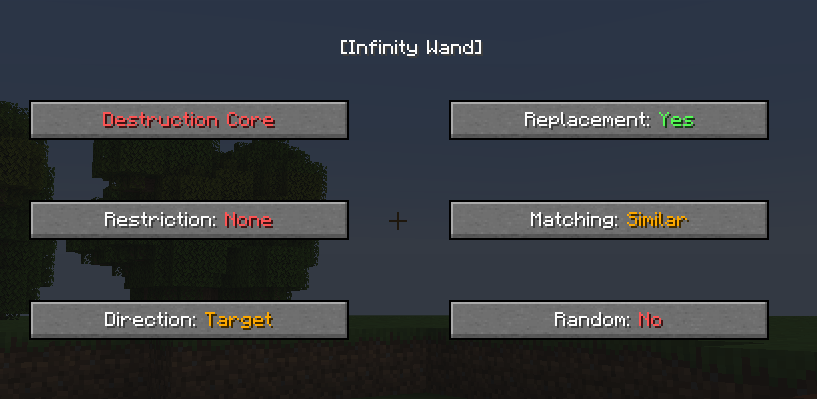
To open the options menu of your wand, hold left shift AND the control key, then right click an empty space. This lets you manually change a few options:
- Construction, Angel, and Destruction Cores:
- Construction lets you build
- Angel lets you place blocks in midair, or build behind blocks
- Destruction lets you destroy tons of blocks similar to how you place them
- By default, your wand only has the construction core. See how to add the “Angel” and “Destruction” wand cores to your wands below!
- You can also switch these by holding left shift and left-clicking on an empty space.
- Restriction:
- None
- Left/Right: Will only duplicate a horizontal row, 1 block high, from the sides of the original blocks only.
- Up/Down: Will only duplicate a vertical row, 1 block wide, from the sides of the original blocks only.
- North/South: Will only duplicate a row going from north to south, 1 block wide, from the top or bottom of the original blocks only.
- East/West: Will only duplicate a row going from east to west, 1 block wide, from the top or bottom of the original blocks only.
- You can also switch these by holding left shift and scrolling.
- Direction:
- This only affects blocks that change direction based on where you’re facing when you place them. For example, stairs can have different orientations.
- Player will cause new blocks to place as if you had just manually placed them. In other words, they’ll face you.
- Target will cause the new blocks to place in the same orientation as the blocks that got copied, no matter which way you’re facing. This is handy for copying roofs, for instance.
- Replacement:
- Yes will build over / replace replaceable blocks such as grass, flowers, leaves, snow, and fluids.
- No will keep your replaceable blocks intact.
- Matching:
- Similar treats similar blocks (like dirt blocks and grass blocks) as one and the same.
- Any allows you to copy any and all blocks that are touching.
- Exact requires that blocks be exactly the same to copy them.
- Random:
- Yes will place items randomly taken from your hotbar. This makes “texturizing” walls super easy.
- No will only copy what’s already placed.
Upgrading your Wand with “Wand Cores“
There are two different types of “wand cores” that change the functionality of your wand if upgraded:
- Angel Wand Core: (Yellow) Allows you to place blocks in midair, or place blocks behind the block you’re looking at.
- Destruction Wand Core: (Red) Works exactly the same as construction, only it deletes blocks instead! Destroy rows and massive amounts of blocks with ease.
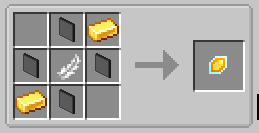
Crafting Cores: The recipe for the Angel Wand (yellow) is shown on the left, and the recipe for the Destruction Wand (red) is shown on the right.
- For both, any glass panes can be used for the upper middle, lower middle, left middle, and right middle spaces.
- For the angel wand, any feather may be used in the middle.
- Unfortunately, the gold ingots and diamond block/pickaxes are not interchangeable.

Adding Cores to your Wand:
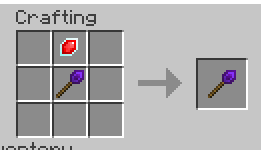
- Your wand must be iron quality or better to have cores added to them.
- You should try to use the core on the highest quality wand possible, so that they don’t break when your wand does.
- To add a core to your wand, open a crafting table, and put both your wand and the core on any space.
- A single wand can have both core upgrades, you just have to craft them together separately (add one core, then take the wand and add the second core)
To switch between modes, hold the left shift key and left-click on any empty space. Or open your menu 🙂 (see above).
Using Angel Mode to place a block in midair: While holding the wand, and while the wand is in angel mode, put whatever block you want to place in your off-hand, then place the block like normal.
Undoing Actions
To undo your last action, hold the left shift and control buttons. You will see your last placement (or destruction) bordered by green. While still holding left shift and control, right click any of the block to undo the action. If you undid a placement, you’ll get your blocks back.
The end!
 Game Board